 Little Snitch 4 Help
 Little Snitch 5 Help
 Little Snitch 6 Help
Search and filter
The more rules you have, the harder it gets to find a particular one. The Rules window gives you four tools that narrow down the list, and you can combine them:
- The sidebar chooses which part of your rules you look at, for example a single rule group or profile.
- The search field finds rules that contain particular text, such as the name of an app or a server.
- Filters show only rules with particular properties, such as deny-rules or rules for incoming connections.
- Focus mode shows only the rules that can affect a particular process.
Which tool to use depends on your question:
- Where are my rules for Safari? Search for “Safari”.
- Which rules deny something? Click the Deny filter.
- Why is this connection denied? Use focus mode on the process that makes the connection.
Search field
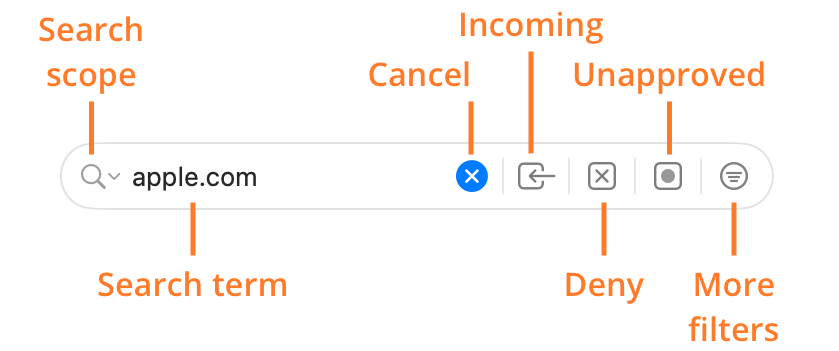
- Search scope: Which properties of a rule Little Snitch searches, see Search scopes.
- Search term: One or more words. Little Snitch shows only the rules that contain all of them.
- Cancel: Deletes the search term.
- Incoming: Shows only rules for incoming connections.
- Deny: Shows only deny-rules.
- Unapproved: Shows only rules that you haven’t approved yet.
- More filters: Opens a menu with more filters, see Filters.
The Networks view has a search field too, but without the filter buttons, which apply only to rules. When you select a blocklist in the sidebar, the filter buttons change to filters for blocklist entries, see Manage blocklists.
Search scopes
By default, Little Snitch searches all properties of your rules. To search only some of them, click the magnifying glass in the search field and choose a scope:
- All: Searches all properties of the rules, for example the process name and the remote endpoint. This is the default.
- Process: Searches only the process names.
- Server: Searches only the remote endpoints: hostnames, domains, and IP addresses.
- Enclosing Folders: Searches the folders that contain the executable of the process.
- Bundle Identifier: Searches the bundle identifiers of the apps.
- Notes: Searches the notes of the rules.
How the search matches
Little Snitch splits your search term into words at the spaces, and shows the rules that contain all of the words in the selected scope. A few details make searching more precise:
- To search for a phrase, put it in double quotes, for example
"App Store". - A search word with a dot must match complete parts of a domain name:
bar.comfindsfoo.bar.com, but notfoobar.com. - An IP address also finds the rules for address ranges that contain it. Parts of addresses, such as
192.168, work too.
Two things the search doesn’t find:
- Rules for Any Process, when you search for a process. Those rules do apply to the process, though. To see all rules that apply to a process, including these, use focus mode.
- Blocklist entries, unless you search for a single hostname, domain, or IP address. In the rule list,
google.comfinds blocklist entries, butgoogledoesn’t. When you select a blocklist in the sidebar, though, any search term searches its entries.
Filters
Each of the three filter buttons Incoming, Deny, and Unapproved has a menu of related filters. Click a button to apply its default filter, and click it again to remove the filter. To choose a different filter, click and hold the button, then choose from its menu:
- Incoming button: Incoming, Outgoing, Any Direction.
- Deny button: Deny, Allow, Ask, Hide, Show Notification, Play Sound.
- Unapproved button: Unapproved, Protected, Factory, Active Rules, Inactive Rules. If View > Show Disabled Rules is on, the menu also has Disabled Rules.
The More filters button opens a menu with these filters:
- Process Owner: Me, System, Anyone.
- Process Type: Application, Background Process, Web App, macOS Process, iOS Simulator Process.
- Server: Any Server, Domain, Hostname, IP Address.
- Blocklists: Shows only the rules that represent a blocklist.
- Internet Access Policy: Shows only the rules for apps with an Internet Access Policy (IAP).
While one of these filters is active, the More filters button shows its icon. To remove the filter, click the button again.
Sidebar
The sidebar decides which rules the list shows, and so which rules the search field and the filters work on. Select a rule group, for example, and you see only the rules of this group.
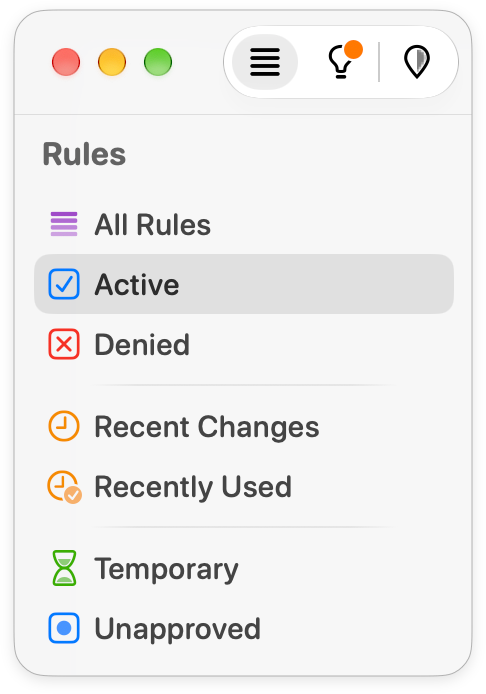
The sidebar does more than filter, though:
- To add rules to a rule group or a profile, drag them onto it in the sidebar.
- When you select a blocklist, the list shows its entries instead of rules, see Manage blocklists.
Focus mode
Focus mode shows all rules that can affect the connections of a particular process, and only these. This is the quickest way to find out why a connection of the process is allowed or denied. Within this set of rules, you can still search and filter.
To start focus mode, do one of the following:
- Move the pointer over the process name in the rule list, then click the focus button next to it.
- Right-click a rule of the process and choose Focus on Rules Affecting “…”.
The list also shows the rules for Any Process, because they affect this process too. To see only the rules for the process itself, turn off Include rules for “Any Process” in the top bar.
In focus mode, the list is sorted by precedence by default: the rules are in the order in which Little Snitch checks them. For each connection, the first rule from the top that matches decides whether the connection is allowed or denied.
To end focus mode, click the clear button at the right end of the top bar.
© 2016-2026 by Objective Development Software GmbH