 Little Snitch 4 Help
 Little Snitch 5 Help
 Little Snitch 6 Help
Rules window
The Rules window is where you look after your rules, blocklists, rule groups, and profiles. It’s the main window of the Little Snitch app.
To open the Rules window, start the Little Snitch app from the Applications folder like any other app, or click Rules and Profiles at the bottom of the Control Center.
The Rules window has three views, which you switch at the top: Rules for your rules and blocklists, Insights for suggestions on how to improve them, and Networks for the networks that Little Snitch knows. In each view, the sidebar on the left chooses what the list in the middle shows, and the Inspector on the right shows the details of what you select.
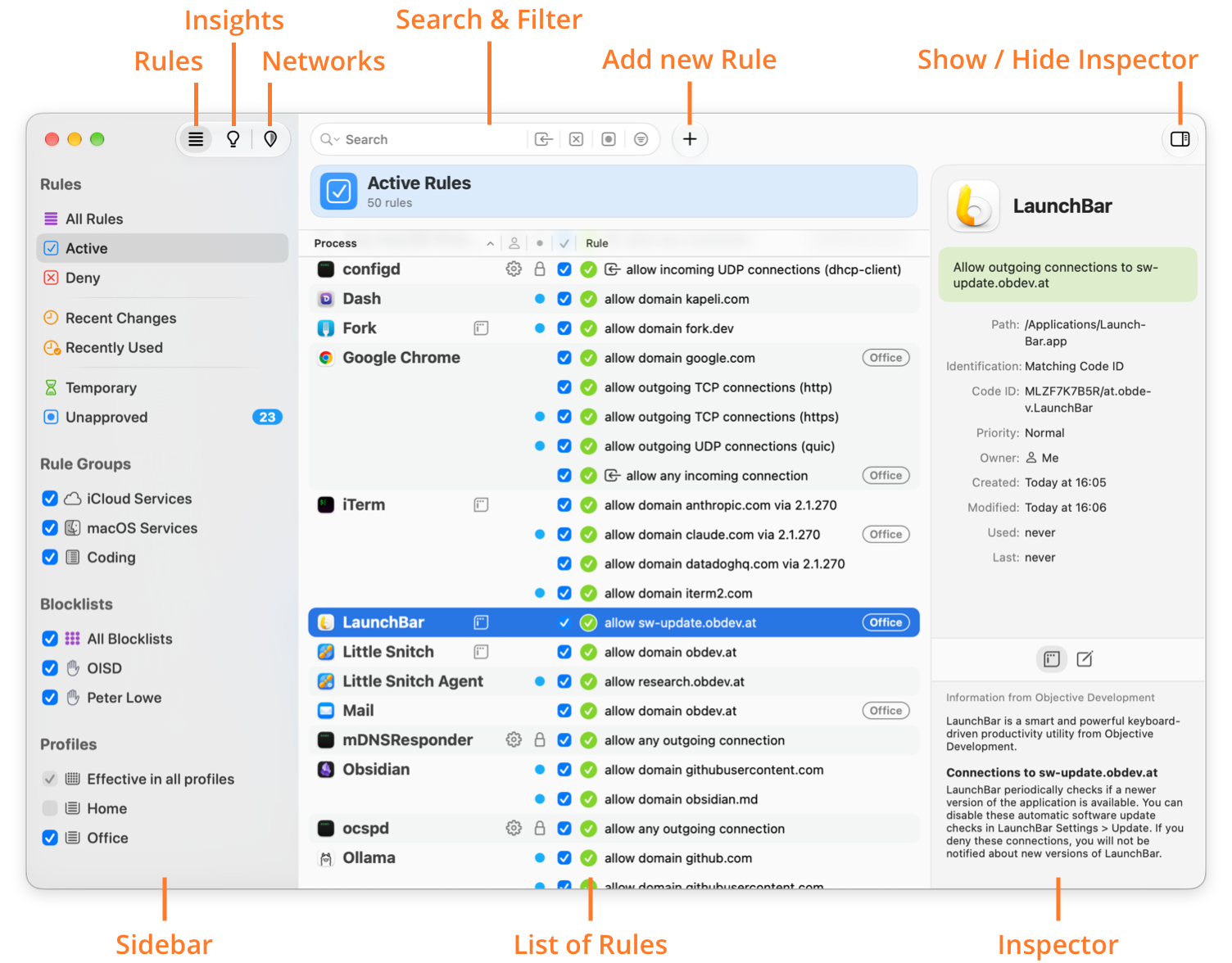
- Rules: Click here to work with your rules. The example above shows this view.
- Insights: Click here for insights into how to improve your rules.
- Networks: Click here to see everything about Automatic Profile Switching (APS).
- Search & Filter: Shows only the rules that match a search term or a filter, see Search and filter.
- Add new Rule: Click here to create a new rule in the rule editor.
- Show / Hide Inspector: Click here to show or hide the Inspector.
- Sidebar: Chooses what the list shows. In the Rules view, for example, you can show only the rules with a particular property, or only the entries of a blocklist.
- List of Rules: The rules themselves, in the Rules and Insights views. To sort the list, click a column header. For the icons in the list, see Icons. The list has the following columns:
- Process: The process of the rule. Little Snitch shows each process once, above its rules.
- Process owner: No icon means that the rule is for your own processes (Me), a gear means processes of the system (System), and two persons mean processes of any user (Anyone).
- Status: A lock marks a protected rule, such as a factory rule. A blue dot marks a rule that you haven’t approved yet.
- Enabled: Clear the checkbox to disable the rule.
- Rule: What the rule does, and for which remote endpoint. A badge on the right shows the profile or rule group of the rule.
- Inspector: The Inspector shows the details of the selected rules.
Understand your rules
Once you have more than a handful of rules, three questions come up again and again. The Rules window answers each of them:
- Which rule wins? Click the Rule header and choose Sort by Precedence. Rules higher up in the list have precedence over the rules below them.
- Which rules affect this process? Move the pointer over the process name and click the focus button , or right-click a rule of the process and choose Focus on Rules Affecting “…”. The list then shows only these rules, see Focus mode. For more ways to narrow down the list, see Search and filter.
- Which connections were affected by this rule? Right-click the rule and choose Show in Network Monitor.
Icons
Icons in the list of rules point out particular properties:
| ICON | DESCRIPTION |
|---|---|
 |
The action of the rule is allow. |
 |
The action of the rule is deny. |
 |
The action of the rule is ask. |
 |
The action of the rule is hide. |
 |
The action of the rule is show notification. |
 |
The action of the rule is play sound. |
 |
Redundant Rule: Another rule already matches each connection that this rule matches. |
 |
Covering Rule: This rule covers other rules, which makes them redundant. |
 |
The rule has high priority, but it would have the same effect with normal priority. |
 |
The rule is protected. You can’t edit or delete it. |
 |
The rule matches incoming connections. |
 |
The rule matches incoming and outgoing connections. |
 |
Invalid Rule: The rule isn’t valid, because the path of its process isn’t valid. |
 |
Process Owner Anyone: The rule matches processes that any user started, including system users. |
 |
Process Owner System: The rule matches processes that the system started. |
 |
The rule becomes inactive after a time interval or when a particular event occurs. |
 |
Unapproved Rule: Little Snitch created the rule for you, for example from a connection alert or a remote rule group, and you haven’t reviewed it yet. |
 |
Unchecked Process: The rule doesn’t check the identity of the process, or it matches processes that aren’t trustworthy. |
 |
The rule has extra-high priority and denies all connections of the process. |
© 2016-2026 by Objective Development Software GmbH