 Little Snitch 4 Help
 Little Snitch 5 Help
 Little Snitch 6 Help
Map
The map shows where the servers that your Mac talks to are located, and draws the connections to them:
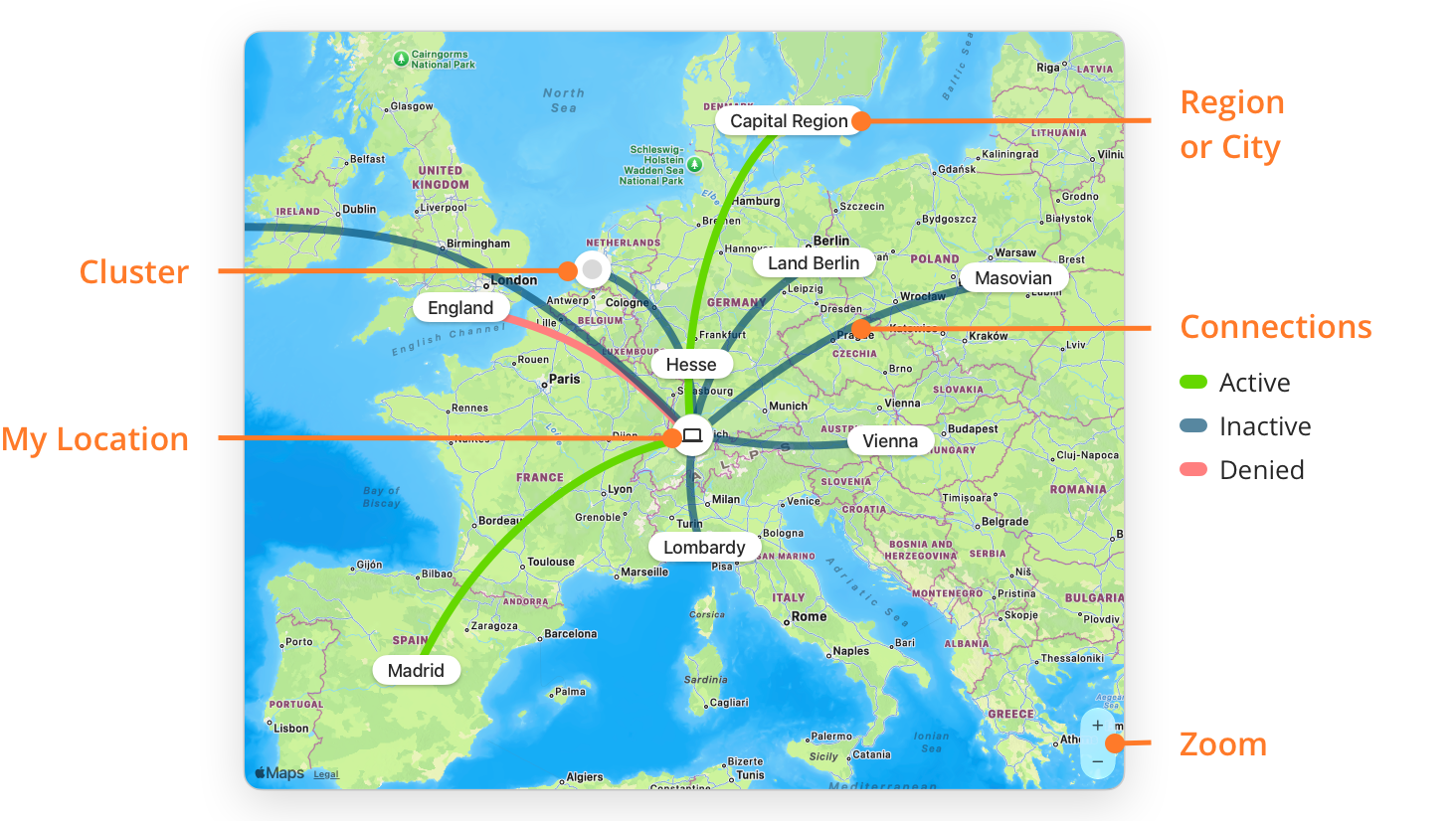
- Region or City: A geographic location. For some servers, Little Snitch knows the city. For others, it knows only the continent. And for some, such as servers in a private network, it has no location at all. Little Snitch shows these at a placeholder location in the Atlantic Ocean, where you can’t mistake them for a real location.
- Cluster: When symbols are too close together, Little Snitch combines them into one cluster symbol. Zoom in to see them separately.
- Connections: A line goes from My Location to the location of each server. The lines show the connections that you selected in the connection list, or all connections if nothing is selected. The color shows the state of the connection:
- Active (green): Data went through this connection a short time ago.
- Inactive (blue): No data has gone through this connection for some time.
- Denied (red): Your rules or blocklists deny or block all connections in the connection list to this location.
- My Location: The location of your Mac, see Set your own location below.
- Zoom: Click these buttons to zoom in or out, or use a pinch gesture on the trackpad.
Instead of the map, Network Monitor can show the Connection Log, which lists data transfers and denied or blocked connection attempts as they happen.
Set your own location
At first, Little Snitch takes your location from the Region setting in System Settings > Language & Region. There are two ways to make it more precise:
- Let Little Snitch find your location with Apple Location Services. Little Snitch then keeps it up to date, even when you travel. To turn this on, right-click the map and choose Automatically Determine My Location. You can also turn on Automatically update my location in map in Settings > Monitor of the Little Snitch app.
- Set it yourself: right-click the map at your location and choose Set My Location Here.
Information about a location
To see the connections to a particular place, click its city, region, or cluster. You can select more than one. The connection list then shows only the connections to the selected locations, with their processes, hostnames, and domains. For more details, open the Inspector.
© 2016-2026 by Objective Development Software GmbH