 Little Snitch 4 Help
 Little Snitch 5 Help
 Little Snitch 6 Help
Control Center
The Control Center is a convenient starting point for interacting with Little Snitch. It shows at a glance what your Mac is doing on the network, provides quick access to various settings, and takes you to Network Monitor and the Rules window. To open it, click the Little Snitch icon in the menu bar, or press the keyboard shortcut that you set in the Control Center settings. If you want it to stay open, you can detach it from the menu bar.
From top to bottom, the Control Center has four parts: the main switches, the traffic of the last five minutes with the most active processes, the connections that Little Snitch recently denied, and your widgets.
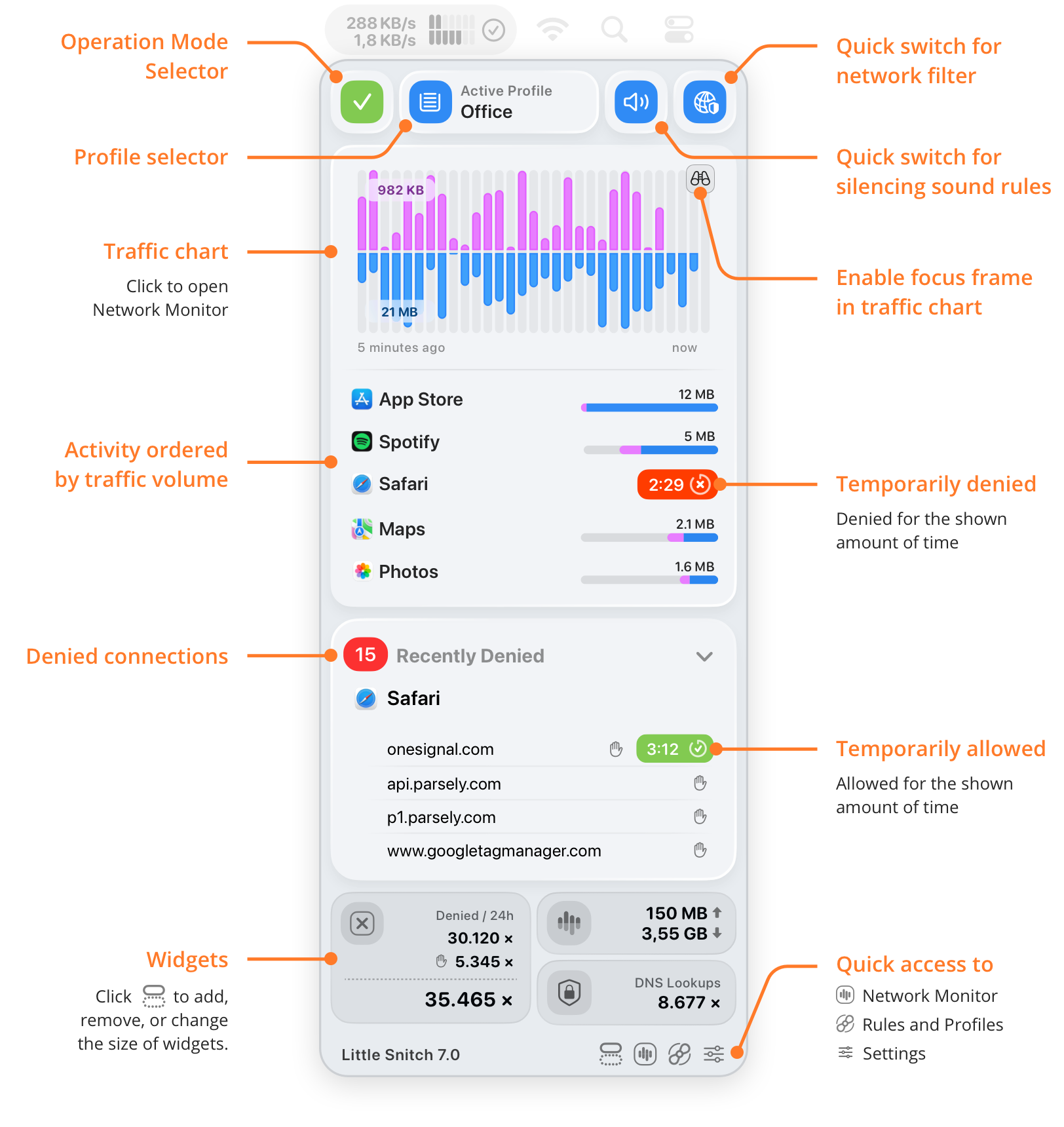
- Operation Mode Selector: Choose the operation mode: Alert Mode, Silent Allow, or Silent Deny.
- Profile selector: Choose the active profile. You see this control only if you have profiles.
- Quick switch for network filter: Turns the network filter on or off. While it’s off, your rules have no effect, and Little Snitch allows all connections.
- Quick switch for silencing sound rules: Turns your sound rules on or off. You see this control only if you have sound rules.
- Traffic chart: The traffic of the last five minutes. Click the chart to open Network Monitor.
- Enable focus frame in traffic chart: Move the pointer over the focus icon at the top right of the chart to show the focus frame. Then move the pointer over the chart: the list of processes shows only those that sent or received data in that time interval. Click a time interval to open Network Monitor with a time filter for it.
- Activity ordered by traffic volume: The five processes with the most traffic in the last five minutes. Click a process for a menu:
- Show in Network Monitor: Opens Network Monitor and selects the process.
- Show Rules: Opens the Rules window and shows the rules for the process.
- Deny for 5 Minutes: Creates a temporary rule that denies all connections of the process for five minutes.
- Temporarily denied: A temporary rule denies all connections of this process. The badge counts down the remaining time, see temporary rules.
- Denied connections: The connections that Little Snitch denied in the last five minutes, grouped by process. The red badge shows how many different connections were denied; if a process tries the same connection again, it doesn’t count twice. To collapse or expand the list, click the arrow to the right of Recently Denied. Click an entry for a menu:
- Show in Network Monitor: Opens Network Monitor and shows the denied connections of the process.
- Show Rules or Show in Blocklist: Opens the Rules window and shows the rules that denied the connection. If a blocklist blocked it, the item is Show in Blocklist and shows the blocklist entries instead.
- Copy Domain or Copy IP Address: Copies the name or the address of the server.
- Allow for 5 Minutes: Creates a temporary rule that allows the connection for five minutes.
- Temporarily allowed: A temporary rule allows this connection. The badge counts down the remaining time, see temporary rules.
- Widgets: Numbers of your choice. To add, remove, or resize widgets, click the Edit Widgets button at the bottom, see widgets.
- Quick access to: The buttons at the bottom open other windows:
- Network Monitor: Opens Network Monitor.
- Rules and Profiles: Opens the Rules window.
- Settings: Opens the Settings window.
What you can do here
- Switch the operation mode or the profile, for example when you leave the office, with the selectors at the top.
- Turn the network filter off for a moment, for example while you investigate a connection problem: if it goes away, you know that a rule or a blocklist is involved. Don’t forget to turn the filter on again.
- See what’s using your network right now, in the list of the five most active processes.
- Find out what caused a traffic peak: move the pointer over the peak, and the list of processes shows only those with traffic at that time. To dig deeper, click the chart and analyze the traffic in Network Monitor. See focus mode.
- Stop an app for a few minutes, with Deny for 5 Minutes in the menu of a process. See temporary rules.
- Find out why something didn’t work, in the Recently Denied list. To try without the denial, use Allow for 5 Minutes.
© 2016-2026 by Objective Development Software GmbH