 Little Snitch 4 Help
 Little Snitch 5 Help
 Little Snitch 6 Help
Connection details
Sometimes the summary in the connection alert isn’t enough to decide. Is this really the app it claims to be? Who runs the server? Which process actually makes the connection? The details answer these questions. To see them, click the Details button in the alert, or press D.
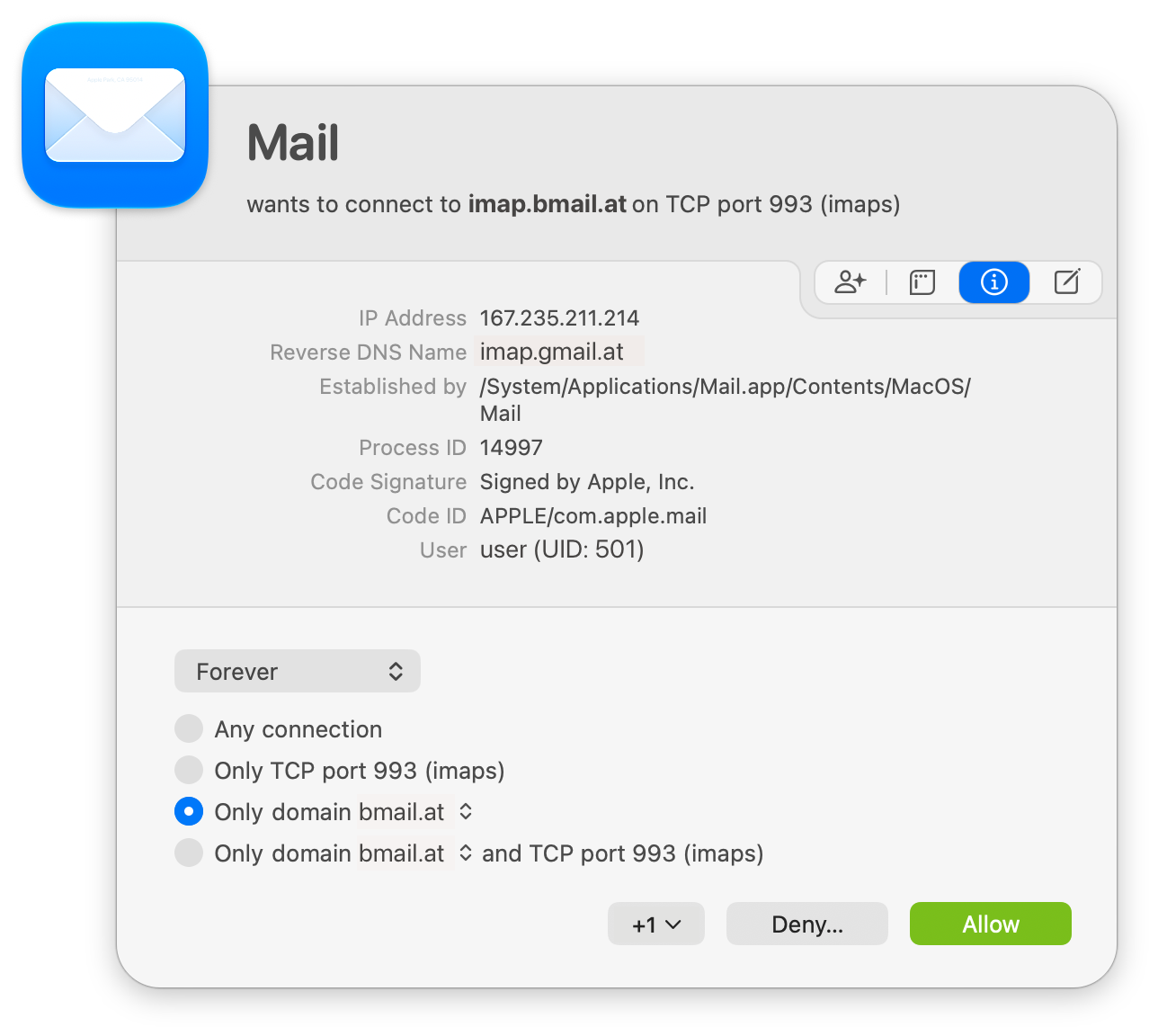
With the details open, the description at the top of the alert also shows the port and the protocol, and the alert offers all options for the rule, such as Only TCP port 993 (imaps).
What to look for
You don’t need to read every field. These are the ones that usually help:
- Who runs the server? The Reverse DNS Name often reveals the owner of the IP address, for example a cloud provider or a content delivery network, even when the hostname in the description doesn’t.
- Is the app genuine? Code Signature tells you which developer signed the process. If you expected an app from a well-known developer and see a different name, or none, be careful.
- Is something wrong with the code? An Unsigned Library field means that the process loaded code that nobody signed. That’s often a developer’s mistake, but it’s worth a closer look.
- Which process actually connects? The title of the alert names the app that wants to connect. But an app can use a helper process to make the connection, for example a command line tool. Established by shows the process that actually establishes the connection, so you can see whether a helper is involved, and which one.
All fields
The middle section of the alert shows the following fields. Some of them appear only when they apply to the connection:
- IP Address: The IP address of the server.
- Reverse DNS Name: The hostname that the internet’s DNS system gives for the IP address. It’s often different from the name that the process used to find the IP address, and it can tell you who owns the address.
- Established by: For an outgoing connection, the full path of the process that makes the connection.
- Connecting to: For an incoming connection, the full path of the process that accepts the connection.
- Process ID: The numeric Unix process identifier of the process.
- Code Signature: The name of the developer who signed the process.
- Code ID: The Code ID of the process, which Little Snitch calculates from its code signature. If the process has a Code ID, rules use it to identify the process.
- Unsigned Library: When macOS reports that the code signature of the process isn’t valid, an unsigned dynamic library can be the cause. If the process loaded such a library, this field shows it.
- User: The short name and the numeric identifier of the user account that runs the process.
- Parent Application: If the process acts on behalf of an app, the full path of this app.
- Process ID (parent): The numeric Unix process identifier of the parent app.
- Code Signature (parent): The name of the developer who signed the parent app.
- Code ID (parent): The Code ID of the parent app. If the app has one, rules use it to identify the app.
- Unsigned Library (parent): The same as Unsigned Library above, for the parent app.
- Alternate DNS names: If more than one hostname leads to the IP address of the connection, the hostnames that the description doesn’t show.
- Name from DPI: A name that Little Snitch found in the first data packet of the connection. It appears only when Little Snitch doesn’t know a unique hostname for the server. The process very probably used this name to connect, but Little Snitch can’t prove it.
© 2016-2026 by Objective Development Software GmbH