 Little Snitch 4 Help
 Little Snitch 5 Help
 Little Snitch 6 Help
Inspector
The connection list tells you that a connection happened. The Inspector, on the right side of the Network Monitor window, tells you everything else: who made it, where it went, which rules applied, and how much data it transferred. To open it, do one of the following:
- Click Show Inspector in the toolbar. While the Inspector is open, the same button is Hide Inspector.
- Choose View > Show Inspector.
- Press Command-I.
Summary view
With nothing selected in the connection list, the Inspector summarizes all connections in the list.
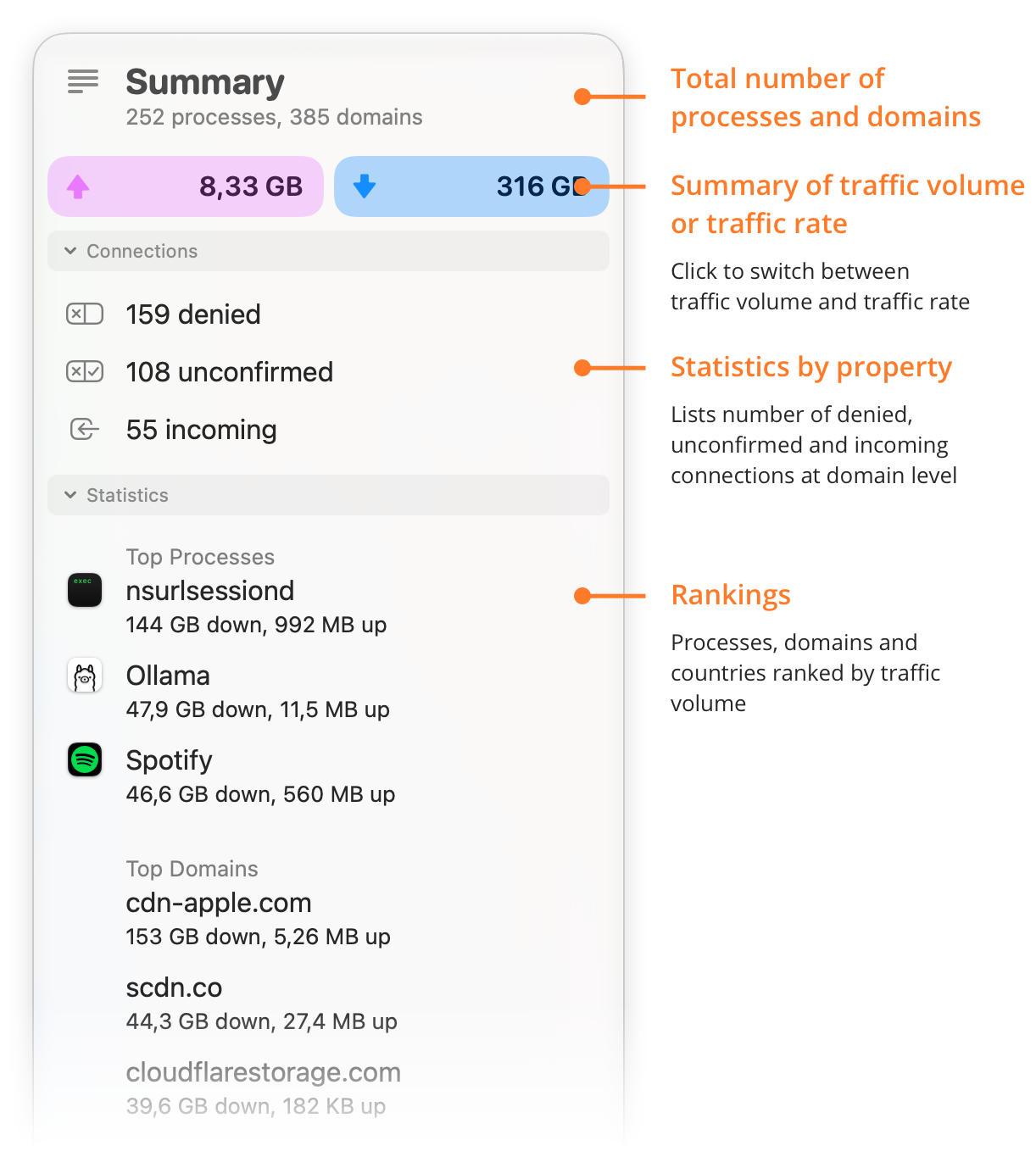
- Total number of processes and domains: How many different processes and domain names the list contains.
- Summary of traffic volume or traffic rate: The total traffic volume sent and received, or the current traffic rate. Click the field to switch between the two.
-
Statistics by property: How many connections, counted per domain, fall into each of three groups:
- denied: A rule denies them.
- unconfirmed: They occurred in Silent Mode, and no rule covers them yet.
- incoming: The server started them.
Click a line to show only these connections in the list.
- Rankings: The processes, domains, and countries with the most traffic (Top Processes, Top Domains, Top Countries).
Detail view
When you select one or more connections in the connection list, the Inspector shows their details:
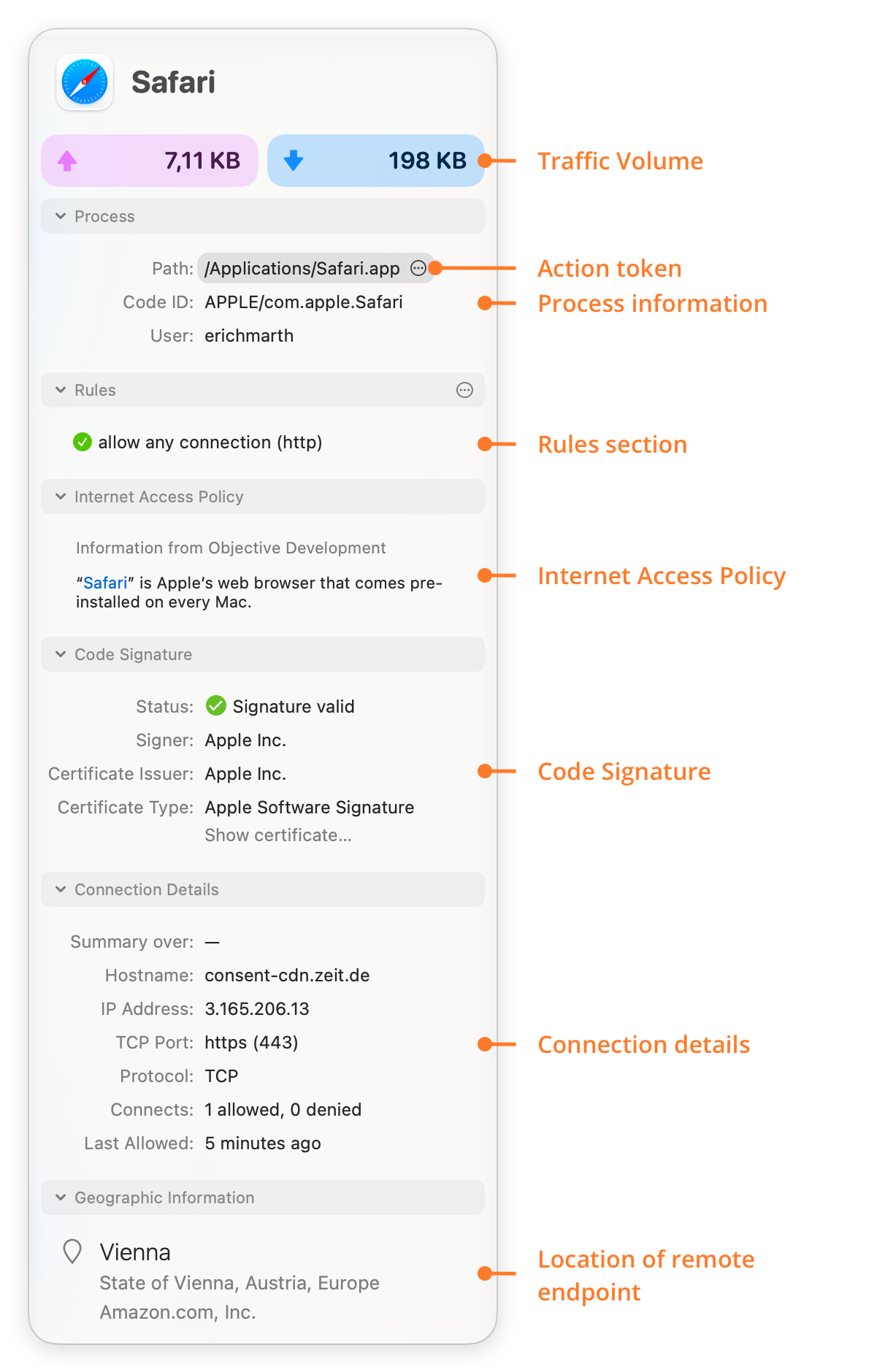
- Traffic Volume: The total traffic volume sent and received in the time interval that Network Monitor shows. Click the field to switch to the current traffic rates and back.
- Action token: Click the ellipsis button in the path for a menu: Show in Finder shows the process in Finder, and Copy Path and Copy Name copy its path or name.
- Process information: The path and the Code ID of the process, and its owner, that is, the user who started it.
- Rules section: The rules that apply to the selected connections, see Rules section.
- Internet Access Policy: If available, the Internet Access Policy tells you what the connection is for.
- Code Signature: Whether the app or the executable on disk has a valid code signature, and who signed it. Little Snitch checks the whole app bundle with all its resources, so for large bundles such as Xcode, this can take a moment.
- Connection details: Information about the server, and statistics:
- Summary over: The time interval of the statistics: from the first recorded connection until now, unless you select a different time interval.
- Hostname: The hostname that the process used for the connection. Click a hostname to show only the connections to this hostname.
- IP Addresses: The IP addresses of the hostname that the connections used. Click an IP address to show only the connections to this address.
- TCP Port, UDP Port: The TCP and UDP ports of the connections. Click a port number to show only the connections with this port and protocol.
- Protocol: The protocol of the connections. Click a protocol to show only the connections with this protocol.
- Connects: How many connections Little Snitch allowed (for connection-based protocols), and how many connection attempts it denied.
- Last Allowed: The time of the last allowed connection.
- Last Denied: The time of the last denied connection.
- Location of remote endpoint: The section Geographic Information shows what the IP address database knows about the server: its city, state, country, and continent, and the owner of the address range, if known. If the connections go to several locations, the Inspector shows only what they have in common. Click an item to show only the connections to this location.
When you select a line in the Connection Log, the Inspector shows the details of its connection.
Rules section
The rule button tells you that rules apply to a connection. The Rules section tells you which ones. It lists all rules that apply to the selected connections, except redundant ones, in the order of their precedence: the rule that wins comes first. The last entry is always the default rule, which applies when no other rule matches. Its action depends on the operation mode: ask in Alert Mode, allow in Silent Allow, and deny in Silent Deny.
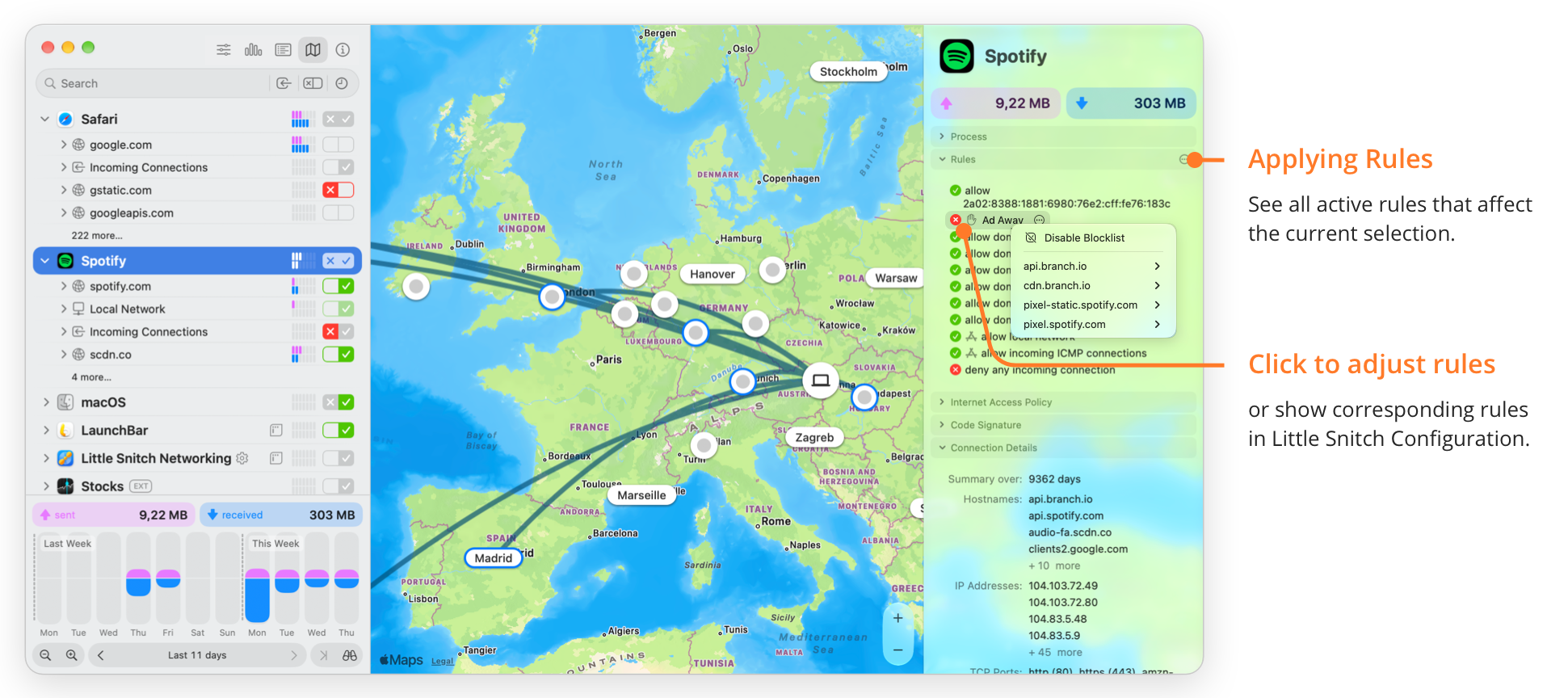
- Applying Rules: The rules that apply to the current selection. The menu button in the section title offers two items:
- Show in Rule List: Shows all these rules in the Rules window.
- New Rule…: Creates a new rule in the Rules window.
- Click to adjust rules: Click a rule for a menu:
- Show in Rule List: Shows the rule in the Rules window.
- Edit Rule…: Opens the rule for editing in the Rules window.
- Increase Priority: Gives the rule high priority. For a rule that already has high priority, this item is Decrease Priority.
- Disable: Disables the rule. For a disabled rule, this item is Enable.
- Delete: Deletes the rule.
If a blocklist blocks the connection, the list shows the blocklist too. Click it for a menu:
- Disable Blocklist: Disables the whole blocklist.
- A submenu for each blocklist entry that applies, for example
api.branch.io, with these items:- Disable Blocklist Entry…: Disables this entry. Little Snitch asks you to confirm, because this affects all other apps and processes too.
- Allow for “…” Only: Creates an allow-rule with high priority for just this app, which wins over the blocklist.
Instead of rules, the section can show one of these messages:
- No rules for these connections: No rule applies to the selected connections.
- Multiple processes selected: The selection contains connections of several processes. To see rules, select the connections of a single process.
The Inspector often shows dates as relative times, such as “25 minutes ago”, or in ISO format. To see them as absolute dates in your local format, hold down the Option key.
© 2016-2026 by Objective Development Software GmbH