 Little Snitch 4 Help
 Little Snitch 5 Help
 Little Snitch 6 Help
Dashboard and Log
Is DNS encryption working, and how well? The Dashboard and the Log answer that. Use them to check your resolvers, and to track down the cause when something goes wrong.
Dashboard
The Dashboard shows all metrics of DNS encryption in one window. To open it, click the status of a resolver in Settings > DNS, for example Active, then click Full Metrics in the popover.
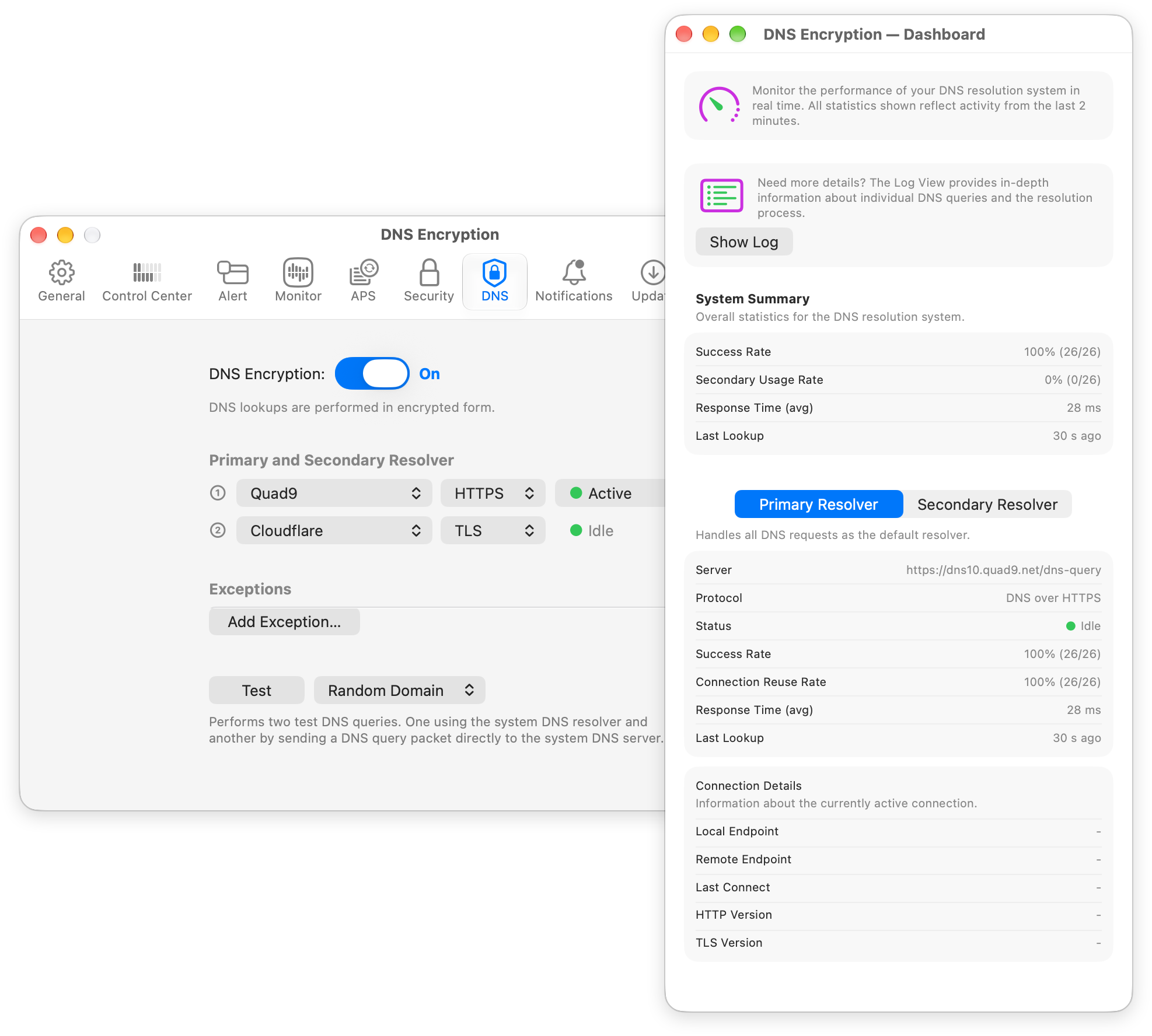
The window DNS Encryption — Dashboard covers the last 2 minutes and has the following sections:
- Show Log: Opens the log of the DNS lookups.
- System Summary: The metrics for all lookups:
- Success Rate: The percentage of lookups that got an answer. The numbers in parentheses are the successful lookups and all lookups.
- Secondary Usage Rate: The percentage of lookups that the secondary resolver answered.
- Response Time (avg): How long a lookup took on average to get its answer.
- Last Lookup: The time of the most recent lookup.
- Primary Resolver / Secondary Resolver: Click one of these buttons to see the metrics of that resolver. If you configured exceptions, there’s a third button, Exception Resolver. Lookups for an exception can’t go to an encrypted resolver, so Little Snitch sends them unencrypted, either to the DNS server of the exception or to the default DNS server of the system. Exception Resolver shows the metrics of these lookups. For each resolver, the Dashboard shows:
- Server, Protocol, and Status of the resolver.
- Success Rate, Response Time (avg), and Last Lookup, as above, but only for this resolver.
- Connection Reuse Rate: The percentage of lookups for which Little Snitch could use a connection to the resolver that was already open.
- If lookups failed, fields such as Last Failure, Error, and Consecutive Failures.
- Connection Details: Information about the current connection to the resolver: Local Endpoint, Remote Endpoint, Last Connect, HTTP Version, and TLS Version.
Log
The log shows each DNS lookup and every step that Little Snitch took to resolve it. To open it, click Show Log in the Dashboard. The window DNS Encryption — Log opens.
The log has the columns Time, Request, Connection, Resolver, Protocol, Delta, Status, and Message. Delta is the time since Little Snitch first saw the lookup. The buttons in the toolbar control the log:
- Pause / Resume: Stops or continues showing new lines.
- Now: Scrolls to the current time and keeps scrolling as new lines arrive. When you scroll back to read something, the automatic scrolling stops. Click Now to start it again.
- Clear: Removes all lines from the log.
- Errors: Shows only the lines with errors. Click it again to show all lines.
© 2016-2026 by Objective Development Software GmbH