 Little Snitch 4 Help
 Little Snitch 5 Help
 Little Snitch 6 Help
About profiles
A profile is a set of rules that applies only when you need it. With profiles, your Mac can follow different rules in different situations: one set at the office, another in a hotel’s Wi-Fi network. If you like, Little Snitch switches between them automatically, depending on the network that your Mac joins.
When profiles help
Profiles are most useful on a laptop that you take to different places. A few examples:
- Public Wi-Fi networks: In a café or a hotel, you share the network with strangers. A profile for public networks can deny all connections to and from the local network.
- Tethering: When your Mac connects to the internet through your phone, data can be slow or expensive. A tethering profile can deny software updates and other large downloads until you’re back on a regular network.
- Presentations: When you show slides in a talk, you don’t want a connection alert to pop up in front of your audience. A presentation profile can switch Little Snitch to Silent Mode.
How profiles work
Every rule either belongs to one profile or to none. A rule without a profile is effective in all profiles: it applies all the time, whichever profile is active. Most of your rules are probably of this kind.
At most one profile is active at a time. Little Snitch then uses the rules of that profile plus all rules that are effective in all profiles. Rules in other profiles have no effect. If no profile is active, only the rules that are effective in all profiles apply.
The diagram shows an example with two profiles:
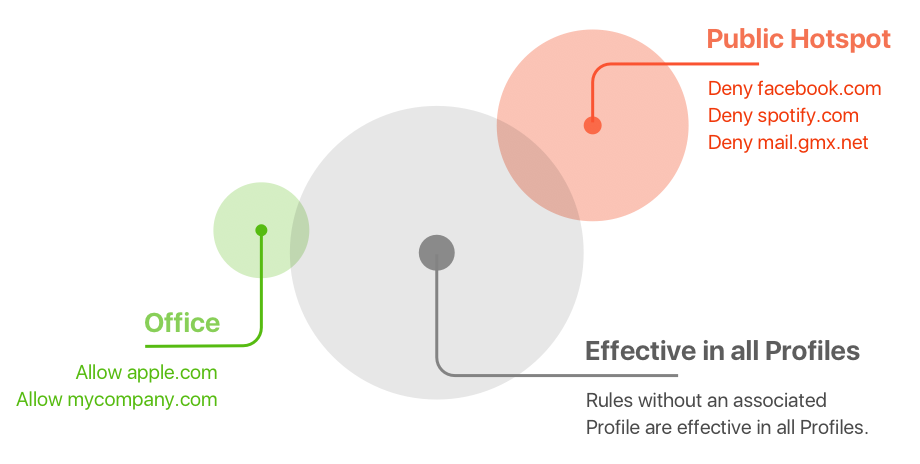
While Office is active, Little Snitch allows connections to apple.com and mycompany.com, in addition to all rules in the gray circle. While Public Hotspot is active, it denies connections to facebook.com, spotify.com, and mail.gmx.net instead.
A profile doesn’t give its rules a higher rank. If a rule in the active profile and a rule that is effective in all profiles match the same connection, the more specific rule wins, as always (see Rule precedence). A profile rule for the domain example.com, for example, can’t override a rule for the hostname www.example.com that is effective in all profiles. If you want the profile rule to win anyway, give it high priority.
A profile can also set the operation mode. When the profile becomes active, Little Snitch switches to that mode, for example to Silent Mode for presentations.
Switch profiles
You can switch profiles yourself, for example with the profile selector in the Control Center. Or you let Little Snitch do it with Automatic Profile Switching (APS): you assign networks to a profile, and whenever your Mac joins one of these networks, Little Snitch activates the profile.
To create profiles, assign rules to them, and set up APS, see Manage profiles.
© 2016-2026 by Objective Development Software GmbH