 Little Snitch 4 Help
 Little Snitch 5 Help
 Little Snitch 6 Help
Create and edit rules
Most rules come from your answers to connection alerts or from Network Monitor. But you can also create and change rules directly, in the rule editor of the Rules window.
Learn more about rules…
To create a rule:
- In the toolbar of the Rules window, click the Add new Rule button .
- In the rule editor, set the properties of the rule.
- Click OK.
To edit a rule, double-click it in the rule list.
To edit several rules at once:
- Select the rules in the rule list.
- Right-click the selection, then choose Edit Rules….
- Change the properties.
- Click OK.
The rule editor looks almost the same for a new rule and for an existing one:
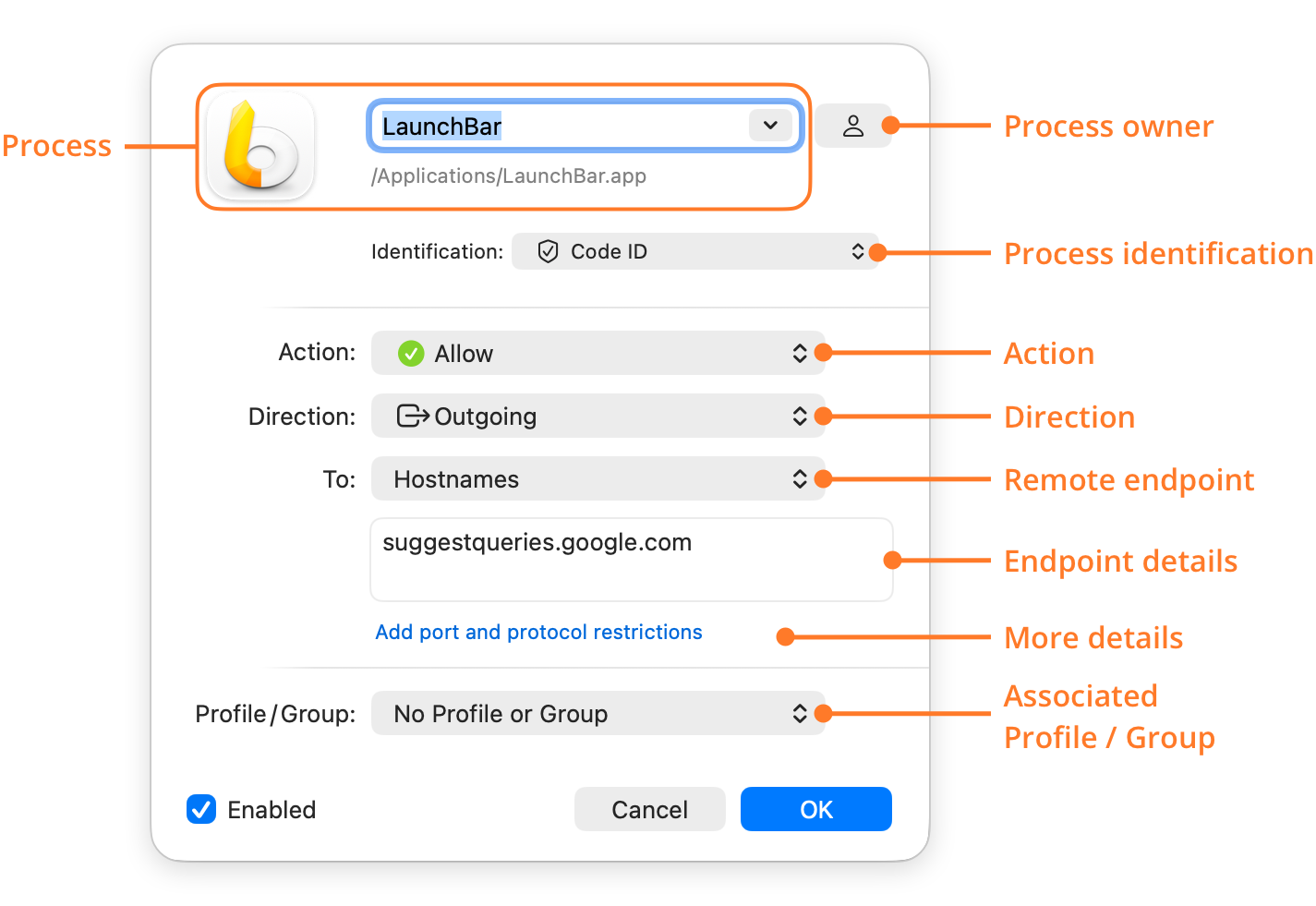
- Process: The process that the rule matches. For a rule that matches all processes, choose Any Process. You can type the name of an app or of a Unix command, and Little Snitch finds the full path. To choose the process from a menu, click the pop-up button in the text field.
- Process owner: Click the button to the right of the process to choose whose processes the rule matches. The button then shows the matching icon:
- Me: Only your own processes.
- System: Only system processes.
- Anyone: The processes of all users. If Allow Global Rule Editing is off in Settings > Security, Little Snitch asks for the name and password of an administrator.
- Process identification: How Little Snitch recognizes the process: by its Code ID, or by its path in the file system, with or without an identity check. If the rule matches any process, you can limit it to processes with a valid code signature.
- Action: What Little Snitch does when the rule matches (the action): Allow, Deny, Ask, Hide, Show Notification, or Play Sound. For Show Notification and Play Sound, the editor shows more settings. Scope sets which connections the rule reacts to: Allowed Connections, Denied Connections, or Allowed or Denied Connections. For Play Sound, you also choose the sound.
- Direction: Whether the rule matches Outgoing connections, Incoming connections, or Any Direction.
- Remote endpoint: What kind of server the rule matches, for example hostnames, domains, IP addresses, the local network, or the Berkeley Packet Filter. See Remote endpoint.
- Endpoint details: For domains, hostnames, IP addresses, and some other kinds of remote endpoints, the actual values. You can enter several, separated by commas or spaces. For IP addresses, you can also enter ranges, as 1.2.3.4 - 5.6.7.8 or in CIDR notation.
- More details: To restrict the rule to particular ports and a protocol, click Add port and protocol restrictions. Enter the ports as a list of port numbers and ranges, for example 20-30, 80, 443.
- Associated Profile / Group: The profile or rule group that the rule belongs to. You can also drag the rule onto the profile or the rule group in the sidebar.
© 2016-2026 by Objective Development Software GmbH